
Secure Crypto Wallet: Crypto is new, but the idea behind it is old. If you keep something valuable, you guard it well. In the world of Bitcoin and blockchain, your wallet is that treasure box. The big twist is this. There is no bank manager to call if you lose the key. You are the bank. You hold the keys. If the keys are gone, the money is gone. That is scary the first time you hear it, but it is also powerful. You control your own money with no one in the middle.
This guide makes the first step easy. We will talk about the types of wallets, how to set one up, how to back up your seed phrase the right way, and what to do to avoid common mistakes and scams. I want you to finish this guide with two things. One, you know which beginner wallet to pick and how to set it up. Two, you understand the habits that keep you safe for years, not just days.
Some facts to set the stage. In different industry reports, a big chunk of stolen crypto is linked to weak key security. Attackers go after private keys and seed phrases because that is the direct door to the funds. Also, a famous estimate says around 3.8 million Bitcoin is lost forever. That is about 19 percent of the total supply. A lot of it is because people lost keys and old backups. Transactions are final and there is no “undo.” So your choices at setup time matter a lot.
We will keep it simple. We will focus on non-custodial wallets, because they give you true ownership, and we will still explain custodial options so you understand the tradeoffs. Think of this guide as your easy roadmap. Set up a wallet, protect the seed, use good hygiene, and sleep better at night.
Contents
- 1 Why Secure Crypto Wallets Matter, and How To Choose One
- 2 Wallet Basics in Plain English
- 3 Five Essential Tips To Set Up a Secure Crypto Wallet
- 4 A Simple, Beginner-Friendly Setup You Can Follow Today
- 5 Common Questions (FAQs)
- 5.0.1 1. Which wallet is best for beginners
- 5.0.2 2. How do I set up a wallet step by step
- 5.0.3 3. Wallet vs exchange account
- 5.0.4 4. Why can’t I store my seed phrase digitally
- 5.0.5 5. Hot vs cold, which is better
- 5.0.6 6. Do I really need a hardware wallet
- 5.0.7 7. How to store for the long run
- 5.0.8 8. Is a custodial wallet safe
- 5.0.9 9. How to know a wallet is legit
- 5.0.10 10. What is a passphrase, do I need it
- 5.0.11 11. Can I change my 12 words
- 5.0.12 12. I lost my seed phrase, can I recover my coins
- 5.0.13 13. Do I need to change wallets often
- 5.0.14 14. Is it safe to keep crypto on my phone
- 5.0.15 15. What if my hardware wallet breaks or is stolen
- 5.0.16 16. Should I use multiple wallets for different coins
- 5.0.17 17. What is 2FA and why is it important
- 5.0.18 18. How to avoid phishing
- 5.0.19 19. What to do if you think your wallet is compromised
- 5.0.20 20. Is it okay to share my public address
- 5.1 Real-World Tips Most Beginners Miss
- 5.2 A Short Story To Make It Stick
- 6 Closing Thoughts: Keep It Simple, Keep It Safe
- 7 Quick Reference Glossary : More Keywords
Why Secure Crypto Wallets Matter, and How To Choose One
Let us say it very clearly. Crypto transactions are final. If someone steals your coins, there is no chargeback. If you lose your keys, there is no forgot password button for non-custodial wallets. On top of that, attackers are not lazy. They watch social media, they make fake websites, they send emails that look real, they create fake apps. They want your seed phrase. They want your keys. Many big incidents do not come from some fancy hack. They come from human mistakes, like saving a seed in phone photos, or uploading it to cloud storage, or typing it into a fake “support” chat.
So choosing the right type of wallet and using it correctly is not just nerd stuff. It is basic financial safety in crypto. Here is what you decide first.
- Custodial or non-custodial.
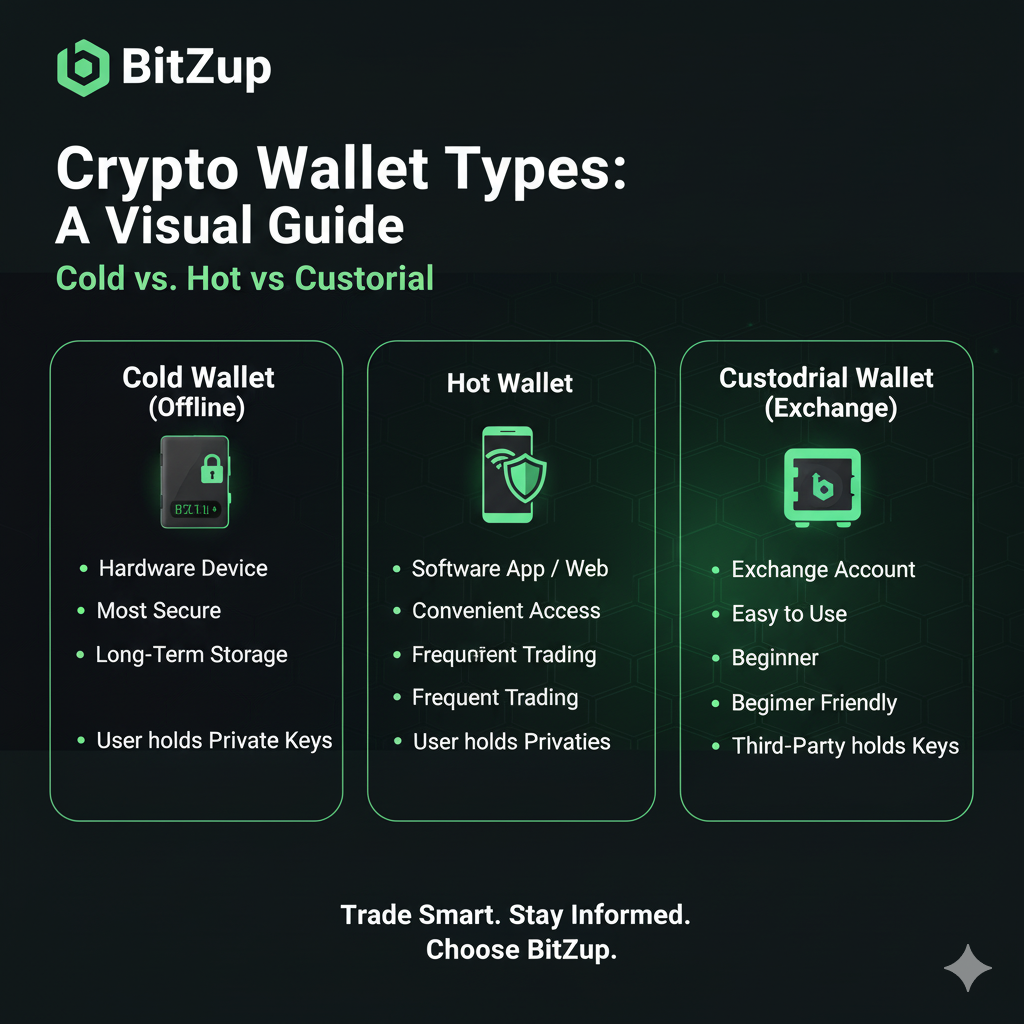
A custodial wallet is like an exchange account. You log in with a password and sometimes 2FA. The company holds the keys. This can be very convenient for beginners, but you are trusting the company on security and rules. A non-custodial wallet means you hold the keys through a seed phrase. No company can move your coins, but no company can save you if you lose the seed. In this guide we lean non-custodial because it teaches you real ownership. - Hot or cold.
Hot means connected to the internet. Think mobile apps and desktop apps. Easy to use, great for small daily amounts, but exposed to online risks. Cold means offline. Think hardware wallets and paper backups. Harder for a random hacker to reach. Better for savings.
For many beginners, a good plan is to start small with a simple hot wallet to learn how sending and receiving works. Then, when you hold more value or you plan to hold long term, add a hardware wallet for savings. This is just like using a checking account and a savings account. The hot wallet is your checking, the hardware wallet is your savings.
Wallet Basics in Plain English
Custodial vs non-custodial
- Custodial. A company controls the private keys. You get ease of use, password resets, sometimes even insurance for certain events. The tradeoff is trust. If something happens to the company, or they freeze withdrawals due to policy or a crisis, you wait.
- Non-custodial. You control the keys. Freedom and responsibility go together. If you back up well and follow best practices, you get very strong security. If you cut corners, you take the hit. Non-custodial is the spirit of crypto. Your keys, your coins.
Hot vs cold
- Hot wallets. Phone apps, browser wallets, desktop wallets. Quick to set up, often free. Good for small amounts and daily use. Risk is that your device connects to the internet, so malware and phishing can reach you if you are not careful.
- Cold wallets. Hardware wallets and sometimes paper wallets. Keys stay offline. Transactions require your physical device and a PIN or button press. This makes remote attacks much harder. It is the gold standard for holding bigger amounts.
Mobile, desktop, paper
- Mobile wallets are fast and easy, great for small balances and frequent use.
- Desktop wallets give you a screen and keyboard, good if you manage funds from a computer.
- Paper wallets used to be popular, but paper can get damaged, lost, or misprinted. The idea behind paper wallets still matters, because it teaches you the value of an offline backup.
A simple combo most people use
Many people keep a small hot wallet for daily activity and a hardware wallet for long term. If somebody breaks into your hot wallet somehow, they only see pocket money. Your savings sleep safely on the hardware wallet. Later, if you hold a lot or you run a business, you might explore multisignature setups where two or more keys must approve a transaction. That removes single points of failure, but it is advanced. For a beginner, a hardware wallet with a clean seed backup is already great security.
Five Essential Tips To Set Up a Secure Crypto Wallet
Let us set it up with a simple plan. If you follow these steps, you reduce most beginner risks in one go.
1) Use a hardware wallet for long term storage
If you plan to hold crypto for months or years, a hardware wallet is a smart buy. The device stores your keys offline. When you send a transaction, the wallet signs inside the device. The private key never leaves. Even if your computer has malware, the attacker cannot read the key from the hardware wallet. You still need to set a good PIN and keep the device safe, but this one choice cuts a huge amount of risk.
Is a hardware wallet necessary on day one? Not always. If you only have a tiny amount, start with a hot wallet to learn. Once your balance grows to a number that would hurt if you lost it, move to a hardware wallet. Many people pick Ledger or Trezor. Both have been around a long time. There are other brands too. The big rule is buy from the official source, keep the box seals, and never use a device that came with a pre-printed seed. If someone “kindly” gives you a seed card in the box, that is a red flag. Real devices make you generate your seed yourself during setup.
2) Back up your seed phrase the right way
Your seed phrase is your master key. Usually 12 or 24 words. Write it by hand. Do not store it in phone photos. Do not email it to yourself. Do not save it in cloud notes. Do not type it into random websites. Keep it offline.
Here is a simple method.
- Write the words clearly, in the right order, with the numbers 1 to 12 or 1 to 24 on the left.
- Make a second copy. Keep the two copies in different safe places.
- Use a fireproof safe at home if you can. Some people also use a bank deposit box.
- If your handwriting is messy, write slowly. This is one time to be careful.
- Do not take a picture of the paper. Not even once.
- If you live in a humid place or you worry about fire or water, consider a metal backup plate. You can engrave or stamp the words. Metal plates are not cheap, but they can survive disasters.
A big chunk of lost crypto is just people losing the seed. They change phones, they wipe a laptop, they think they can remember the words, they cannot. Make the backup a habit. It is boring, but it is what saves you.
3) Protect pins, passwords, and private keys
Treat your wallet like a serious lock, not a toy. Use a strong PIN on the hardware wallet. Use a strong password on your phone wallet. Do not reuse passwords. If somebody gets your device, a good PIN may still block them.
Nobody legit will ask for your seed or private key. Not support, not a friend of a friend, not a Telegram admin, not a “recovery specialist.” If someone asks, they are trying to steal from you. Also be careful with browser extensions. Some shady extensions read your clipboard or inject fake wallet popups. Stick to well known tools. Less is more.
Double check what you install. Fake wallet apps exist. They use names and logos that look like the real thing. Download from official stores, check the developer name, and look for real reviews and install counts. On desktop, bookmark the official websites of your wallet and exchange. Do not search for the name each time, because ads can point to fake lookalike sites. A tiny typo in a URL can cost you a lot.
4) Turn on 2FA and extra security features
If you use an exchange or any account that supports two factor authentication, turn it on. Use an authenticator app if possible, not just SMS. SMS can be attacked through SIM swaps. If your wallet or exchange offers address whitelisting, use it. That means you only allow withdrawals to addresses you pre-approve. Many services also delay new whitelist entries for 24 hours, which gives you time to react if someone tries to add their address.
On some hardware wallets, you can enable a passphrase, also called a 25th word. This is advanced, but strong. Even if someone finds your 24 words, they still need the passphrase. If you use this feature, be sure you can remember or store the passphrase safely. If you forget it, the 24 words alone will not open the wallet.
Also, update firmware and wallet apps. Updates patch security issues. Many people skip updates, then get hit by a problem that was already fixed.
5) Stay alert against scams and your own habits
Most attacks do not look like attacks. They look like friendly help. A message that your account is at risk, please verify. A shiny airdrop that needs you to connect a wallet and “sign once.” A famous person reply on social media saying they can double your coins. A direct message from “support” that asks for your seed to “help recover.” None of these are real.
Be slow. When in doubt, do nothing for a minute. Check the address you are sending to. Attackers love clipboard hijacking malware. You copy the address, paste it, it looks fine at a glance, but one or two characters changed, and the money goes to the attacker. For new addresses, send a small test first, wait for confirmation, then send the main amount.
Keep your phone and laptop in good shape. Use screen lock, use device passwords, keep your operating system updated. Do not download random files. Do not run sketchy installers. If someone sends you a file to “open in your wallet,” do not do it. If you get a shock message that you must act now, that is a classic pressure trick. Take a breath. If something is really urgent and real, you can verify from the official app or official support page yourself.
A Simple, Beginner-Friendly Setup You Can Follow Today
- Pick a reputable non-custodial mobile wallet to learn. Set a strong app PIN. Write the seed down. Make two copies. Store them safely.
- Add a small amount of crypto. Try a tiny send and receive. Learn the steps.
- When your holdings grow, buy a hardware wallet. Only from the official source. Set a strong device PIN. Generate a new seed on the device. Write it down twice. Store it well.
- Move your savings to the hardware wallet. Keep a small spending balance in the mobile wallet.
- Turn on 2FA for any exchange accounts. Turn on withdrawal address whitelists if available.
- Update your wallet apps and hardware firmware when you see updates.
Follow this, and you will be ahead of most beginners by a mile.
Common Questions (FAQs)
1. Which wallet is best for beginners
Pick a wallet that is easy to use and well known. Mobile wallets like Trust Wallet and Exodus are friendly. For Ethereum and tokens, many people use MetaMask on browser and phone. The exact choice is less important than your habits. Start with small amounts. Learn to send and receive. When you are comfortable, plan your hardware wallet.
If you are not ready to manage keys on day one, you can start on a good exchange with 2FA and strong security, then withdraw to your own wallet later. The long term goal is to control your keys yourself.
2. How do I set up a wallet step by step
- Install the wallet from the official store or site.
- Create a new wallet.
- Write the seed words on paper. Double check. Store safely.
- Set a PIN or password in the app.
- Receive a small amount of crypto to test.
- Send a tiny bit to another address to test.
- You are done. Keep learning and follow updates.
3. Wallet vs exchange account
A personal wallet is for holding and managing your coins with your own keys. An exchange account is for trading and converting, with the exchange holding the keys. Long term storage fits the wallet. Frequent trades fit the exchange. Many people use both, but savings belong in your own custody.
4. Why can’t I store my seed phrase digitally
Digital places get hacked or synced. Photos get uploaded to cloud by default. Emails live on servers. Text files sit on laptops that get malware. Your seed is the one thing you must keep offline. Write it, protect it, and never post it online or in any app.
5. Hot vs cold, which is better
Hot is convenient, cold is secure. Use both. Keep small daily funds hot. Keep savings cold. This simple split beats most risks.
6. Do I really need a hardware wallet
If the amount would make you very sad to lose, yes, get a hardware wallet. It is not magic, you still need to back up the seed and use a good PIN, but it cuts huge risk. If you only have a tiny amount, start with hot, then upgrade when you grow.
7. How to store for the long run
Use a hardware wallet. Make two seed backups. Consider a metal plate. Keep one backup at home in a safe, another in a different secure place. If you have a family, plan how someone you trust can recover funds if something happens to you. This is called crypto estate planning. It is not fun to think about, but it is smart.
8. Is a custodial wallet safe
Big, reputable custodians use cold storage, audits, and multiple approvals. Still, history shows custodians can be hacked or face sudden problems. For small amounts and trading, custodial can be fine if you secure the account with 2FA. For real savings, move to non-custodial.
9. How to know a wallet is legit
Look for real users, open source code if possible, established brand, and a track record. Avoid random new apps with no history. Buy hardware wallets from official stores, not random third parties. During setup, if anything feels odd, stop and recheck. A real new wallet never asks for an existing seed unless you are restoring.
10. What is a passphrase, do I need it
A passphrase is an extra secret on top of your 12 or 24 words. It creates a hidden wallet. It is powerful, but do not use it unless you are sure you can remember or store it well. If you forget it, the 24 words alone will not open your wallet. For very large holdings, a passphrase makes sense. For small holdings, it can be overkill.
11. Can I change my 12 words
No, not in place. The seed is generated by the wallet. If you want a different seed, you create a new wallet and move funds. If you want more security, use a passphrase or a 24 word seed if the wallet supports it.
12. I lost my seed phrase, can I recover my coins
If the wallet app still works on your device, back up the seed right now from the app settings and store it safely. If the app is gone and you have no seed, there is no way back. Some people try partial recovery with hints or tools, but success is rare and risky. This is why we write the seed at setup. It is painful to lose it later.
13. Do I need to change wallets often
No. Keys do not expire. If you suspect a device has malware, move to a new wallet. If you want privacy, use fresh addresses. Keep software updated. Otherwise, you do not need to rotate wallets for no reason.
14. Is it safe to keep crypto on my phone
Yes, for small amounts, if you use a phone lock and an app PIN and you are careful with downloads and links. Do not store your life savings on a hot phone wallet. Move bigger amounts to cold storage.
15. What if my hardware wallet breaks or is stolen
If it breaks, you restore on a new device using your seed. If it is stolen, your PIN should protect it. Still, the safe move is to use your seed to move funds to a fresh wallet that the thief does not know. This takes minutes if you are prepared.
16. Should I use multiple wallets for different coins
Many wallets support many coins. Some chains need their own wallet. Using a few wallets is fine. Just keep backup notes organized so you know which seed belongs to which wallet.
17. What is 2FA and why is it important
2FA is a second step on top of your password. On exchanges, it stops most account takeovers. Use an authenticator app if possible. It is a small extra tap that can save a lot of pain.
18. How to avoid phishing
Never click random links in emails and DMs. Go to the site by typing it or using your bookmarks. Do not enter your seed on any website. Double check sender names and domain spellings. If a message creates panic, slow down and verify from the official app or site.
19. What to do if you think your wallet is compromised
Move fast. Create a new secure wallet on a clean device or with your hardware wallet. Move the funds. Revoke suspicious permissions for smart contracts if you used DeFi. Scan your device. Change passwords. Learn what went wrong so it does not happen again.
Yes. It is called public for a reason. People need it to send you money. Others can see the balance and activity if they know the address, so think about privacy, but there is no way to steal coins with only the public address.
Real-World Tips Most Beginners Miss
Here are small habits that add up.
- Do a test transaction. When you withdraw from an exchange to your wallet, send a tiny amount first. Wait, confirm, then send the rest.
- Use labels. In your notes, write which seed belongs to which wallet, which chain, and any passphrase note if you use one. Keep the note separate from the seed words.
- Keep secrets off camera. Do not write your seed in front of a webcam or a home camera. Sounds paranoid, but better safe than sorry.
- Check the first and last few characters. When you paste an address, check the first four and last four characters match your intended address.
- Avoid public Wi-Fi for sensitive steps. If you must, use a VPN.
- Beware of “airdrops” that ask for approvals. Some tokens land in your wallet and then try to trick you to sign approvals on a dodgy site. Ignore unknown tokens.
- Stay humble. The market gets loud. Scammers shine when greed goes high. If something sounds too good to be true, it almost always is.
A Short Story To Make It Stick
Two friends started with crypto at the same time. One wrote his seed on paper and put it in a folder with bills and random papers. Six months later he cleaned the desk and tossed the folder by mistake. The wallet still worked on his phone, but one day the phone died and could not boot. Funds gone. He learned the hard way.
The other friend bought a small home safe. She wrote the seed twice. One copy at home, one copy at her parents’ house. She set a PIN on the wallet app. She did a tiny test send each time she moved bigger amounts. Two years later, her phone broke. She bought a new phone, restored from the seed, and carried on. Both started with the same coins. One kept them because of a boring habit. The other lost them because of a small shortcut.
This is not a high IQ game. It is a habitual game.
Closing Thoughts: Keep It Simple, Keep It Safe
Wallet security looks scary at first, but the core is simple. Use the right wallet for the job. Back up the seed offline, twice. Guard your PIN and passwords. Turn on 2FA where it applies. Move savings to a hardware wallet when you can. Do not trust links in messages. Take your time when sending. If you do these things, you remove most of the risk that hurts beginners.
Crypto gives you freedom. With freedom comes duty. You are the bank. You are the security team. That sounds heavy, but it is also empowering. Once you build your setup, it becomes routine. You will feel calm when you see scary headlines, because you know your basics are solid.
Final Mini Checklist
- I wrote my seed by hand, I made two copies, and I stored them safely.
- I set strong PINs and passwords.
- I turned on 2FA on exchange accounts.
- I updated my wallet apps and hardware firmware.
- I do test sends for new addresses.
- I keep small amounts in hot wallets and savings in a hardware wallet.
- I never share my seed or keys with anyone.
- I do not click random links or install random apps.
- I feel calm, because my setup is solid.
Start Your Crypto Journey Securely With BitZup
If you want a clean starting point, open a BitZup account and keep security front and center from day one. Set up your first wallet, learn to send a test transaction, and turn on 2FA. BitZup keeps things beginner friendly, so you can buy your first Bitcoin, build a simple portfolio, and grow step by step. Use the tips from this guide as your checklist. Create your account, secure it, and move with confidence. Today is a good day to start right. Follow us on X and Medium.
Quick Reference Glossary : More Keywords
- Private key
A secret code that controls your coins. Anyone with it can move your funds. Keep it private. In modern wallets, this is represented by your seed phrase. - Public key or address
The number you share to receive coins. People can see activity on it. They cannot spend your coins with just this. - Seed phrase
A list of 12 or 24 words that can recreate your wallet on any compatible app or device. Treat it like the master key to a vault. Write it offline, store it safely, never share. - Hot wallet
A wallet connected to the internet, like a phone app or browser wallet. Great for small daily use, more exposed to online risks. - Cold wallet
A wallet kept offline, like a hardware wallet. Much safer against remote attacks, best for savings. - Hardware wallet
A small device that stores your keys offline and signs transactions. You press buttons to confirm. Use a PIN. Back up the seed. - Custodial wallet
A wallet where a company holds your keys. Easy to recover access if you forget a password, but you must trust the company and its policies. - Non-custodial wallet
You hold the keys. You have freedom and responsibility. Backups are your job. - Multisignature wallet
A wallet that needs more than one key to approve a transaction. Good for companies or very large amounts. More complex to manage. - Passphrase or 25th word
An extra secret on top of your seed words. Even with the 24 words, an attacker still needs the passphrase. Strong but advanced. Do not forget it. - Two-factor authentication, 2FA
A second step when logging in, such as a code from an app. Protects exchange accounts and online services. - Phishing
Tricks that try to make you type your seed or password into fake pages. Watch domain names, do not click random links, use bookmarks. - Blockchain explorer
A website that shows transactions and balances for addresses on a blockchain. Use it to confirm your transfers. - Address whitelisting
A setting on some services that lets you lock withdrawals to a list of addresses you choose. Good extra protection.Paper wallet
A printed or handwritten record of keys or seed. It is offline, but paper can be lost or damaged. If you use it, store it very carefully.