
Contents
- 1 Introduction
- 2 Why Your First Crypto Trade Is Important
- 3 How to Make Your First Trade on the Bitzup App
- 4 Step-by-Step Guide to Your First Crypto Trade
- 5 Understanding Fees and Trading Tips
- 6 Risk & Security for Mobile Trading
- 7 Mobile Trading Steps Simplified
- 8 Why the Bitzup App Guide Matters for Beginners
- 9 Extra Best Practices for First-Time Mobile Traders
- 10 Quick-Reference Glossary
- 11 FAQs (Frequently Asked Questions)
- 12 Closing: Key Takeaways
- 13 Download the Bitzup App
- 14 Get Started Safely
Introduction
Making your first crypto trade on mobile looks scary the first time because there are too many buttons, too many coins, and too many horror stories online about people losing money by clicking the wrong thing. The truth is a lot simpler. If you follow a clean, safe flow, your first trade can be done in a few minutes. After that, it starts to feel normal, like doing a UPI payment or checking your bank balance.
The Bitzup app is built for exactly this moment. It is not only a place to buy and sell Bitcoin or Ethereum, it is designed to teach beginners what a secure trade flow looks like. That is why the app asks you to do KYC, to turn on 2FA, to confirm withdrawals, and to check your history. It is not trying to slow you down. It is trying to protect you.
In this long guide we will walk through the exact steps to make your first trade on the Bitzup app, right from download till “Trade Successful.” We will show you where beginners usually make mistakes (like buying 10x the amount by accident), how to review the fees, how to store your receipt, and how to move coins to your own wallet if you want full control. We will also add small case studies so you can see what real users did right and what they did wrong.
By the end, you should be able to do this with your eyes closed:
- Download Bitzup
- Log in safely
- Complete KYC
- Deposit money
- Buy your first crypto
- Check receipt
- Keep it safe
That is it. That is the whole game. After this, every other trade is just a repeat.
Why Your First Crypto Trade Is Important
Your first crypto trade is not just “I bought a coin.” It is actually a learning event. Once you do it end-to-end, you understand five important things at the same time:
- How an exchange works – you see how prices move, how orders get filled, and how fast confirmations come through.
- How fees show up – you understand that it is not only “I bought BTC,” but also “I paid a small trading fee” and “there is a spread.”
- How to review a trade – after the trade, you learn to open History and check that everything is correct.
- How to protect the account – you see where 2FA is required, and why the app keeps asking you to verify.
- How to repeat it safely – once you have done it once, the fear goes away.
A recent survey from Gemini said that 65% of new crypto users make their first trade on mobile. That makes sense. Phones are always in our pocket. We get a signal or a tip, we open the app, we buy. But that also means scammers, fake apps, and phishing links also target mobile users more. So a good, detailed “first trade” guide is not a nice-to-have. It is necessary.
Why this first trade matters so much:
- Confidence building: You stop being a spectator. You become an owner.
- Market entry: Even buying ₹500 worth of Bitcoin puts you inside the crypto economy. You can send it, hold it, later stake other coins, or try DeFi.
- Risk awareness: You learn that one wrong address or one fake app can cost real money. So you become careful from day one.
- System testing: A small first trade lets you test deposit, trade, and withdrawal on Bitzup without risking a big amount.
- Habit creation: Once you know the full flow, you can set up a DCA (dollar-cost average) style habit and keep buying small amounts.
Think of your first trade like your first online bank transfer. The first time, you triple-check the account number. After that, you become smooth. This guide is here to make that first time smooth.
How to Make Your First Trade on the Bitzup App
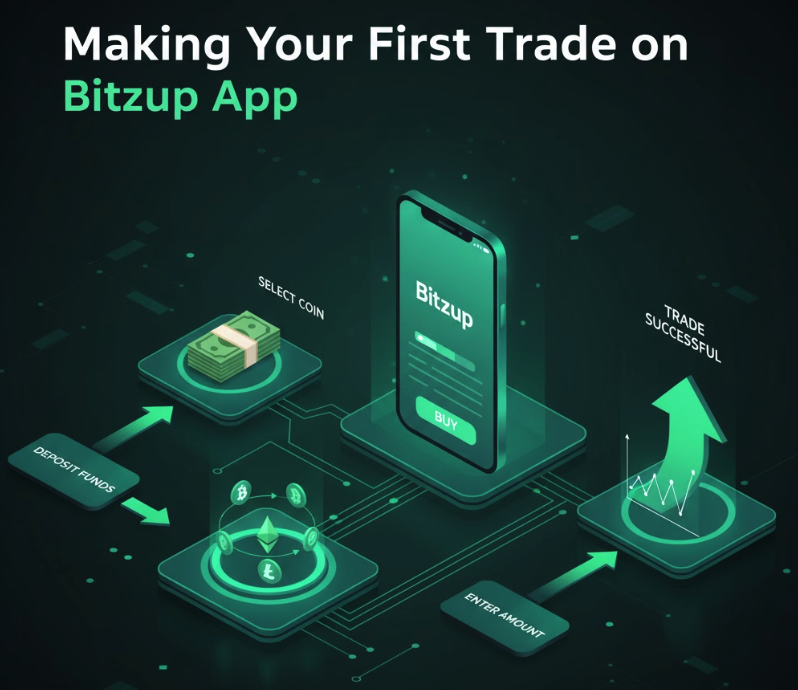
To make your first crypto trade on the Bitzup app, do this:
- Download the official Bitzup app from the App Store or Google Play.
- Create an account with your email or phone.
- Complete KYC so deposits and withdrawals are enabled.
- Enable 2FA for extra security.
- Deposit funds using bank transfer, UPI, or card.
- Go to Trade, choose the crypto you want, enter the amount.
- Pick order type: Market (instant) or Limit (price-based).
- Review fees and final amount.
- Confirm the trade.
- Check your receipt in History.
- (Optional) Transfer to your own wallet for long-term storage.
That is the whole flow. Now let us expand each step properly so you can hand this to a total beginner and they can do it without calling you.
Step-by-Step Guide to Your First Crypto Trade
Step 1 – Download and Log In
- Open the official store – App Store (iPhone) or Google Play (Android).
- Search “Bitzup” – type the exact name.
- Check the publisher – it should be the official Bitzup developer name. If you see lookalike names or weird spelling, do not download.
- Install the app.
- Open it and tap on Create Account or Sign Up.
- Enter your email or mobile number and create a strong password. Use a password manager if you have one.
- The app will probably send you a verification code to email or phone. Enter it.
💡 Tip: Always verify the app is real. Fake crypto apps are one of the easiest ways scammers steal login data. If you found Bitzup from an ad or a forwarded link, double-check in the official store first.
📌 Case Study:
Rajan saw an ad on social media for a “Bitzup Pro” app that promised zero-fee trading. He downloaded it and entered his login details. It was a phishing clone. The attackers tried to use his email/password combo on other exchanges. Because he had 2FA elsewhere, he was safe. The lesson is simple. Always, always download from the official store.
Once you are logged in, turn on 2FA right away. Do not wait. Do not say “I will do later.” Later never comes.
Step 2 – Complete KYC Verification
KYC (Know Your Customer) is not there to trouble you. It is there to protect you and to make sure Bitzup runs under proper rules. It also unlocks higher limits and faster withdrawals.
What you usually need:
- A government-issued ID (passport, driver’s license, Aadhaar, PAN depending on region)
- A clear selfie
- Sometimes a proof of address
How to do it fast:
- Go to Profile → Verification → Start KYC
- Upload your ID. Make sure the image is not blurry and the corners are visible.
- If the app asks for a selfie, take it in good lighting, without filters.
- Submit and wait. Most KYC checks are done in minutes to a few hours.
Why KYC first?
- It prevents fraud and fake accounts.
- It allows fiat deposits (bank, UPI, card).
- It avoids withdrawal block later.
- It makes account recovery easier if you lose your phone.
💡 Tip: If KYC is pending, do not try to deposit 10 times. Let the system finish. If it is taking unusually long, use in-app support and send a clear photo.
Step 3 – Deposit Funds
Now your account is real and secure. Next step is to put some money in.
Deposit methods on Bitzup usually include:
- Bank transfer / UPI (India):
- Pros: low or zero fees, good for regular buys
- Cons: may take a bit longer than card
- Debit / Credit card:
- Pros: instant
- Cons: higher processing fee, some banks add extra charges
- Wallet / local payment options:
- Pros: convenient for local users
- Cons: may have small caps
Beginner rule: deposit small for the first time. Even ₹500 or $10 is fine. Your goal is to test the flow, not to become a whale in 10 minutes.
Steps:
- Go to Wallet or Funds
- Tap Deposit
- Choose Fiat / INR / USD (whichever your account supports)
- Select payment method
- Enter amount
- Confirm
📌 Case Study:
Megha deposited $100 using a debit card because she wanted it right now. She saw a fee of around 3 percent. Next time she used bank transfer and the fee dropped to nearly zero. That 3 percent is not a scam, it is just how card rails work. If you are doing low-frequency, small deposits, card is fine. If you are doing weekly or monthly deposits, bank/UPI wins.
Step 4 – Place Your First Trade
This is the fun part.
- Open the Trade tab on Bitzup.
- Choose the coin you want to buy, for example BTC, ETH, USDT, or any supported asset.
- Enter the amount you want to buy. You can enter in your local currency (like ₹1,000) or directly in crypto (0.001 BTC).
- Choose order type:
- Market Order – buys immediately at the current market price. Best for beginners.
- Limit Order – buys only when the price reaches your chosen level. Best for people who want price control.
- Tap Preview or Review Order.
- Check the fee, the final amount, and the total cost.
- Tap Confirm / Buy / Place Order.
- Enter 2FA if asked.
- You will see Success.
💡 Beginner Tip: Use a Market Order for your very first trade. It will execute instantly. Later, once you are comfortable, start using Limit Orders to control the price and reduce taker fees.
Market Order vs Limit Order in 30 seconds:
- Market = fast but you accept the current price
- Limit = slower but you choose the price
If price is moving fast and you just want to get in, Market is fine. If the market is calm or you are buying a large amount, Limit makes more sense.
Step 5 – Review and Confirm (Do Not Skip)
This is the part many people ignore. They buy and then close the app. Do not do that.
After your order executes:
- Go to History or Orders
- Open Trade History
- Check:
- Coin bought
- Quantity
- Price
- Fee
- Time
- Order type (Market or Limit)
- If you paid with card or a new payment method, check your email or SMS for confirmation.
- If the app supports it, download or screenshot the receipt for your own records.
📌 Case Study:
A beginner meant to buy $100 of BTC but typed 1000. Because she did not check the confirmation screen, the trade went through. When she realized, BTC had already moved. Solution? Always, always pause for 5 seconds on the review page. Check amount. Check pair. Check fee. Then confirm.
Step 6 – Secure Your Assets
Your trade is done. Now what
Right now, your crypto is sitting in your Bitzup in-app wallet. That is good for convenience. You can see it. You can trade it again. You can sell it. But for long-term holding, a lot of people prefer to move funds to a non-custodial wallet (a wallet where they control the seed phrase).
Why move out (optional, but smart for bigger balances):
- If an exchange is ever paused, your coins are still safe with you
- You can connect to DeFi or Web3
- You follow the “not your keys, not your coins” rule
How to secure:
- Turn on 2FA and anti-phishing codes in the Bitzup app
- Set up a hardware wallet or a trusted mobile non-custodial wallet
- Backup seed phrase on paper or metal, never screenshots
- Make a small test withdrawal to your own wallet
- If it arrives, you know the path works
- Then withdraw larger amounts when you need
This is a healthy flow:
Bitzup (buy) → Personal wallet (hold) → Bitzup (sell)
Understanding Fees and Trading Tips

Fees are not bad. Fees are just the cost of using good, secure infrastructure. But you should know what you are paying.
Types of Fees on Bitzup (typical):
- Trading Fees – charged when you buy or sell. Usually a small percentage, and can be different for Maker vs Taker.
- Spread – the tiny difference between buy price and sell price. On liquid coins this is small.
- Withdrawal Fees – when you move crypto out to your own wallet.
- Deposit Fees – often zero for bank/UPI, but card can have processing fees.
How to pay less:
- Use bank transfer / UPI for deposits to avoid card charges
- Don’t do 20 tiny trades; do 1–2 decent size trades
- Use Limit Orders when markets are calm to reduce taker fees
- Withdraw in batches so you don’t pay network fees again and again
📌 Case Study:
Arun made 10 small trades of ₹500 each. Each time he paid a small trading fee and a little spread. At the end, he realized he had paid more than 1.5% in costs just because he kept trading small. When he switched to 2 trades of ₹2,500 each, his total fee dropped a lot. Same money, better structure.
Good habit: Before you confirm any order, check the “You will receive” line. If it looks too low, review the method or the order type.
Risk & Security for Mobile Trading
Crypto is a push system. Once you send, it is gone. There is no “refund me” button on the blockchain. That is why Bitzup keeps pushing security.
Golden Rules:
- Always enable 2FA – authenticator app is better than SMS
- Use a strong, unique password – not your birthday, not 123456, not your Instagram password
- Avoid public Wi-Fi – do not trade from the airport café Wi-Fi
- Keep your phone updated – OS updates often fix security bugs
- Turn on withdrawal whitelist if Bitzup offers it
Common beginner mistakes:
- Logging in from a link sent on WhatsApp
- Downloading a fake Bitzup APK from Telegram
- Sharing OTP or seed phrase with “support”
- Leaving big balances on the exchange without 2FA
- Trading from a rooted or jailbroken device
How to spot phishing:
- “Dear user your account is blocked click here to unlock” → fake
- “You won 1 BTC” → fake
- “Send me your password I will help” → fake
- “We are Bitzup support, tell us your seed phrase” → fake
Real support never asks for your seed phrase. Real support does not ask for your password. Real support can help you through in-app chat.
Mobile Trading Steps Simplified
If you want to explain this to your audience in one line, use this:
Login → KYC → Deposit → Trade → Confirm → Secure
That is the whole mobile trading loop. If a beginner follows this order, they remove 90% of the confusion. Most mistakes happen when people skip straight from Login to Trade without doing KYC or security first.
Why the Bitzup App Guide Matters for Beginners
Without a proper guide, beginners do things in the wrong order. For example:
- They deposit first, then find out KYC is needed for withdrawal
- They trade first, then realize they did not enable 2FA
- They buy a coin, then realize they do not know how to move it
- They use a card every time and wonder why fees are high
- They buy the wrong coin with similar name (this happens a lot)
A structured Bitzup app guide solves this. It shows the exact screens to expect, the safety checks, the review steps, and what to do if something is pending. It also teaches that “pending” does not always mean “scam.” Sometimes a bank is slow. Sometimes the network is busy. A patient, informed user is a safer user.
Extra Best Practices for First-Time Mobile Traders
- Start small – ₹500, ₹1,000, $10, $25. Get the feel.
- Trade only top coins for the first week – BTC, ETH, USDT. Liquidity is better, spreads are smaller.
- Check price on CoinGecko/CoinMarketCap (manually in another tab) just to see that the app price is in the right zone.
- Never trade because of FOMO on your first day. Do a clean test trade first.
- Save receipts – screenshots or downloads.
- Note your first withdrawal address so you do not get confused later.
Quick-Reference Glossary
- Market Order: Buy or sell instantly at current market price
- Limit Order: Buy or sell at the price you choose
- Spread: Difference between the best buy price and best sell price
- KYC: Identity verification needed for full account features
- 2FA: Two-Factor Authentication, extra login security
- Receipt: On-app proof that your order was executed
- Deposit: Adding money/crypto to Bitzup
- Withdrawal: Moving money/crypto out of Bitzup
- Portfolio / Wallet: Where your assets are shown in the app
- Whitelist: A list of trusted withdrawal addresses
FAQs (Frequently Asked Questions)
1. How do I trade crypto on my phone
Download the Bitzup app, complete KYC, deposit funds, go to Trade, pick the coin, choose Market or Limit, confirm, and check your receipt.
2. Is Bitzup safe for first trades
Yes. As long as you download the official app, enable 2FA, and do not share your password or seed phrase, it is safe for first-time users.
3. What is the minimum trade amount
Usually as low as $10 or the INR/equivalent of a small coffee. Small is good for learning.
4. How long does a crypto trade take on mobile
Market orders are instant. Limit orders take time and fill only when the price reaches your level.
5. Why didn’t my order fill
Because you used a Limit Order and the market has not reached your chosen price yet. You can wait or cancel and place a Market Order.
6. Can I cancel an order
Yes, if it has not executed yet. Open Orders → Cancel.
7. How do I review past trades
Go to History or Orders in the Bitzup app. You can see date, pair, amount, fee, and status.
8. What if I lose my phone
You can restore access using your login + KYC. This is why doing KYC is useful. If you also use non-custodial wallets, restore them with your seed phrase (which must be stored offline).
9. Can I trade Bitcoin instantly
Yes. Use a Market Order on the BTC pair.
10. Does Bitzup charge fees
Yes. There is a small trading fee and there may be a withdrawal fee depending on the network. You can reduce effective costs by trading fewer, larger orders.
11. Is debit card the best for beginners
For speed, yes. For low fees, no. Bank/UPI is usually cheaper.
12. Which payment method has the lowest fees
Usually bank transfer or UPI (in India). Card is fastest but not always the cheapest.
13. What is a receipt in crypto trading
It is the proof inside the app that your order was filled. It shows asset, amount, price, and time.
14. Do I really need 2FA
Yes. It blocks most common hacks. Always turn it on.
15. What if I deposit but it doesn’t show
Check transaction status, check bank/UPI screen, and check the Bitzup notification center. If still nothing, contact in-app support with a screenshot and reference number.
16. Can I trade multiple coins
Yes. The Bitzup app supports many coins. Start with top coins first.
17. Is trading taxable
In most countries, yes. Keep your receipts and export transaction history regularly. Talk to a local tax professional.
18. Can I trade 24/7
Yes. Crypto markets never close. You can trade anytime from your phone.
19. Do I need an external wallet before trading
No. Bitzup gives you an in-app wallet. But for long-term or big amounts, moving to your own wallet is safer.
20. Where can I get support
Inside the Bitzup app there is a support/help section. Use only official in-app support, not random Telegram DMs.
Closing: Key Takeaways
Trading your first cryptocurrency on the Bitzup app does not have to be complex or risky. It becomes complex only when people rush or try to do advanced stuff on day one. If you go step by step, it is actually very straightforward:
- Get the real app
- Finish KYC
- Deposit with a low-fee method
- Make a small first trade with a Market Order
- Review the receipt
- Secure your account and, if needed, move to your own wallet
Do this once and you have learned 80% of mobile crypto trading. After that you can explore limit orders, DCA, staking, altcoins, even futures later if available in your region. But always build on a safe base.
Download the Bitzup App
Ready to actually do it
Download the Bitzup app from the official store, create your account, enable 2FA, and make your first tiny trade today. Do not wait for the “perfect” price. Start small, learn the flow, and then scale at your own speed. Your future trades will thank you for getting the basics right on day one.
Get Started Safely
Ready to put this into practice with tiny amounts and zero drama
- Open your trading screen
- Place a small Buy Limit
- Set your Stop and Take Profit
- Log the trade and walk away
Repeat. Improve one detail each week. That is the path from beginner to pro.
🎯 Take Control of Your Crypto Future.
Ready to transition from a vulnerable holder to a digital asset security master? Check our Crypto Security Checklist to audit your current long-term crypto storage setup and ensure every key, every backup, and every account is fully secured.
👉 Ready to stake safely? Start staking on the BitZup App and compare rewards with other exchanges. Join thousands of beginners already earning safely with BitZup.
–> Follow us on X and Medium for regular updates , More Blogs
Not financial advice. Always follow your local laws and do your own research.